A clear photo helps your verification succeed first time.
Taking a clear, high-quality image of your ID document helps ensure your verification passes first time.
Entrust, our trusted identity partner, checks every image for clarity, completeness, and lighting — so precision matters.
Taking a clear, high-quality image of your ID document helps ensure your verification passes first time.
Entrust, our trusted identity partner, checks every image for clarity, completeness, and lighting — so precision matters.
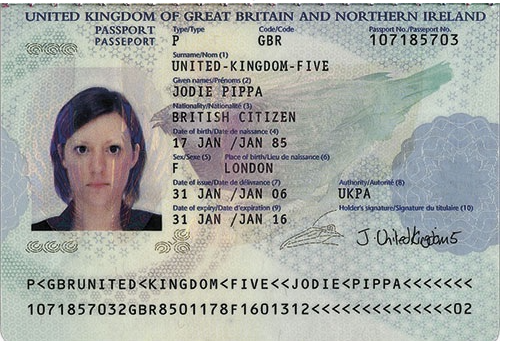
✅ Follow These Steps
- Lay your document flat on a neutral, non-reflective surface.
- Capture all four corners of the document.
- Don’t crop or tilt the image.
- Avoid cutting off edges or text.
- Use good lighting.
- Natural daylight works best.
- Avoid glare from lamps or flash.
- Hold your camera steady.
- Keep it directly above the document.
- Make sure all text is readable.
- Avoid shadows and reflections.
- Watch for dark areas across your photo.
- If glare appears, move your light source or tilt the document slightly.
- Check before you submit.
- All details (name, document number, expiry date) must be sharp and visible.
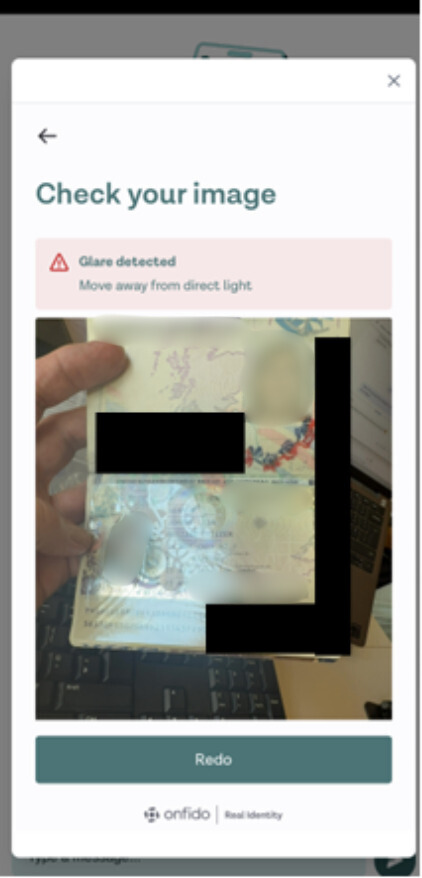
Glare/ camera flash
If you are having difficulty taking an image of your document without a flash or glare covering data please try the following:
- Turn off the flash on your phone or camera
- Take the image in daylight in natural lighting
- Turn off lights in the surrounding area
⚠️ Common Reasons for Rejection
- Blurry or out-of-focus photo
- Glare obscuring text or holograms
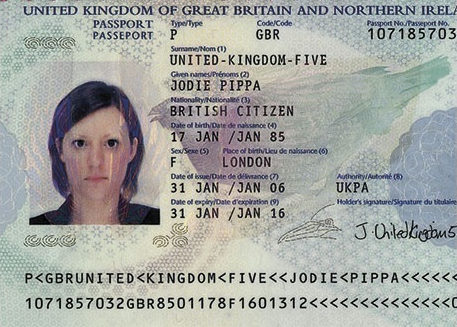
- Edges cropped or cut off
- Flash reflection
- Expired or damaged ID
This image will be rejected as the MRZ (machine readable zone) has been cropped.
💡If you can’t get a clear image, wipe your camera lens and try again.